Create the Inventory
layout for a mobile game
THE SCOUTS | UX / UI ARTIST
THE GAME
A PvP Matchplay game where you shoot a bow and arrow at a target.
You have three attempts taking alternate shots. The player with the highest points is declared the winner.
THE PREMISE OF THE GAME
What can affect the shot?
The players takes turns shooting at a target with a total of three rounds. They will need to judge the distance and the flight path. Other factors that will affect the shots are weather and equipment.
All this equipment can be found in the loot boxes.
The player can use the shard to boost equipment stats for a limited time.
The equipments will consist of:
String
Gloves
Arrowhead
Arrow shaft
Arrow feather
Bow
Inventory screen functionality description:
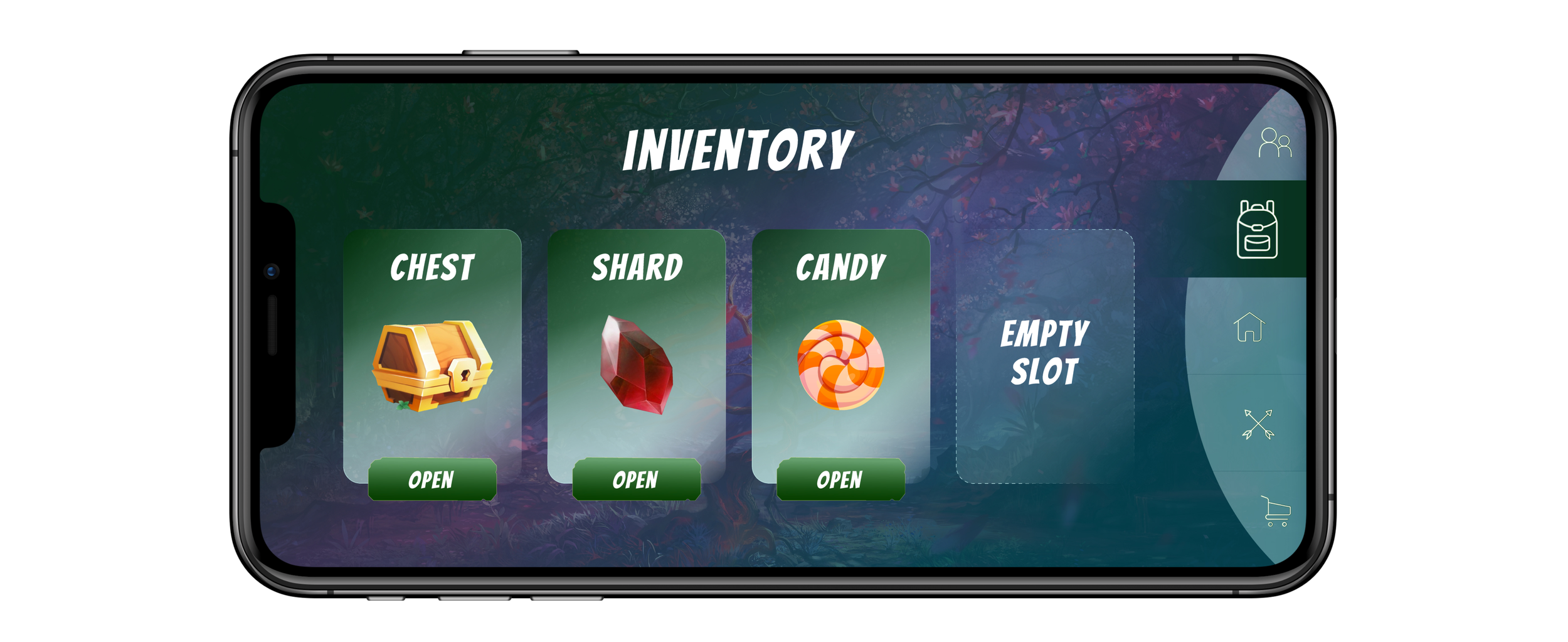
Currently, the Inventory screen contains 3 different types of items:
1. Chest (lootbox)
2. Shard (boost equipment stats)
3. Candy (meta-currency)
Chest and Shard has a tiered hierarchy (common / rare / epic / legendary)
In future updates, new item types can be introduced
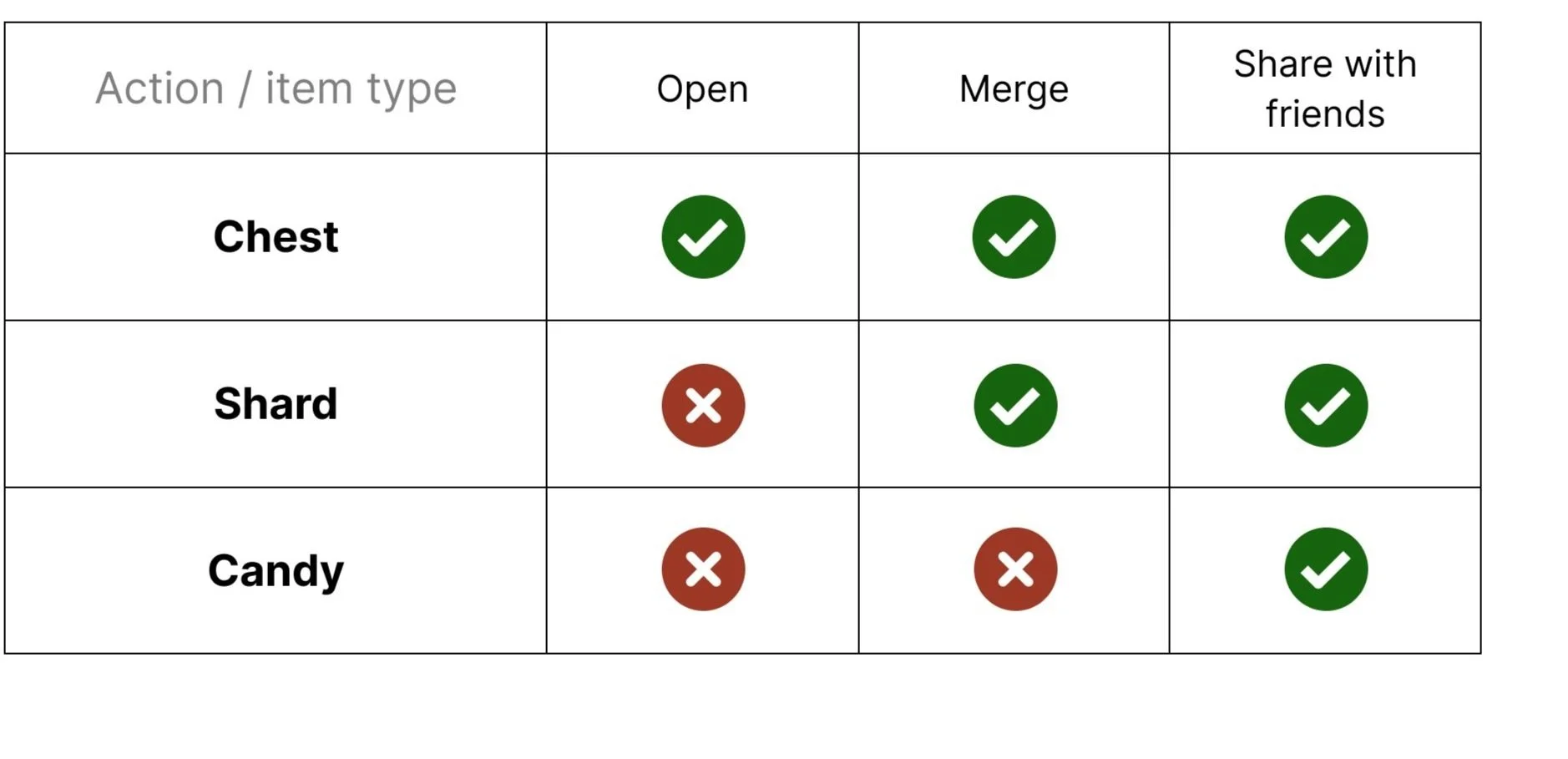
Each item type has a unique amount of actions (see the table below)

The chest (loot box)
Loot boxes are a way to offer players the chance to win sought-after items at random. Finding these rare items will help the player advance such as upgrading equipment. This will increase the stats of the equipment which will enhance gameplay.
Each chest will have a random rarity attached, these rarities are common, rare, epic and legendary. Each chest will also have a random number of badges which represent equipment. The rarest chests will have a larger number of badges and a bigger chance of getting rare badges.
Mechanics of the chest
OPEN
Each chest will have an unlock countdown time before you can open it.
The time increase with how rare the chest is.
COMMON (10 seconds)
RARE (2 hours)
EPIC (4 hours)
Legendary (6 hours)
Each chest will have a random number of badges which represents the types of equipment. Each piece of equipment will have a random percentage chance of rarity.
MERGE
The player can merge chests together to create a new chest.
Merging the chest can result in a chance of creating a new chest with a higher rarity, which could mean more equipment with a bigger percentage chance of a higher rarity.
SHARE
The player can choose to give or sell a chest to a friend.
They can also sell on marketplace, for candy (currency) and trade for equipment or shards.

The shard (boost equipment stats)
The shard is an item that can be found in the chest or won in a match-play.
The player can use a shard as an upgrade item. This can be achieved by merging a shard with a piece of equipment. The stats of the merged equipment will now be boosted for a period of time.
Mechanics of the shard
USE
Each shard will have a rarity attached which is common, rare, epic and legendary.
COMMON (30 Minutes)
RARE (3 hours)
EPIC (12 hours)
Legendary (48 hours)
The shard with a higher rarity will boost the equipment over a longer period of time giving that equipment a better stat boost.
MERGE
The player can merge the shard together to create a new shard.
Merging the shard can result in a chance of creating a new shard with a higher rarity.
SHARE
The player can choose to give or sell a shard to a friend.
They can also sell on marketplace, for candy (currency) and trade for equipment or shards.

The candy (meta-currency)
The candy is an item that can be found in the chest or won in a match-play.
The candy can be used to upgrade equipment as currency and can also be used to purchase from the store. Candy can also be shared among friends and used as currency in trades.
Mechanics of the shard
SHARE
The player can choose to give candy to a friend.
They can also use the candy as currency in the marketplace.
User flows for player objectives
PROTOTYPE DEVELOPMENT
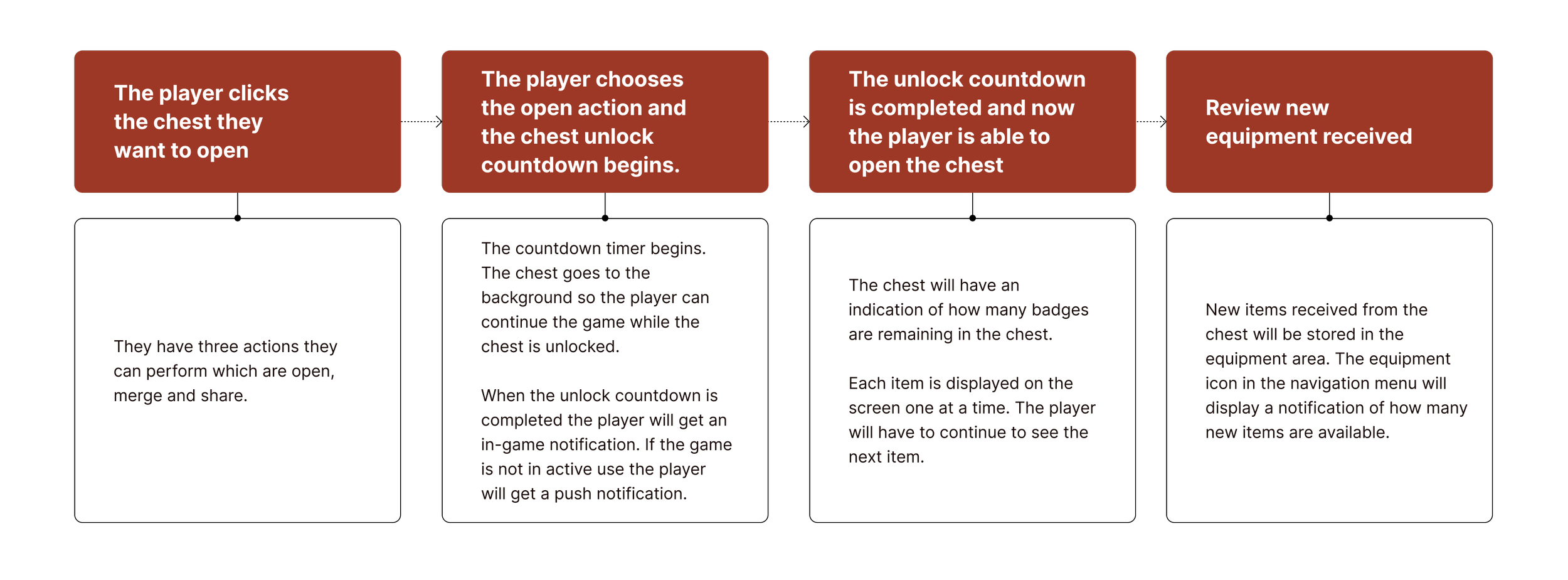
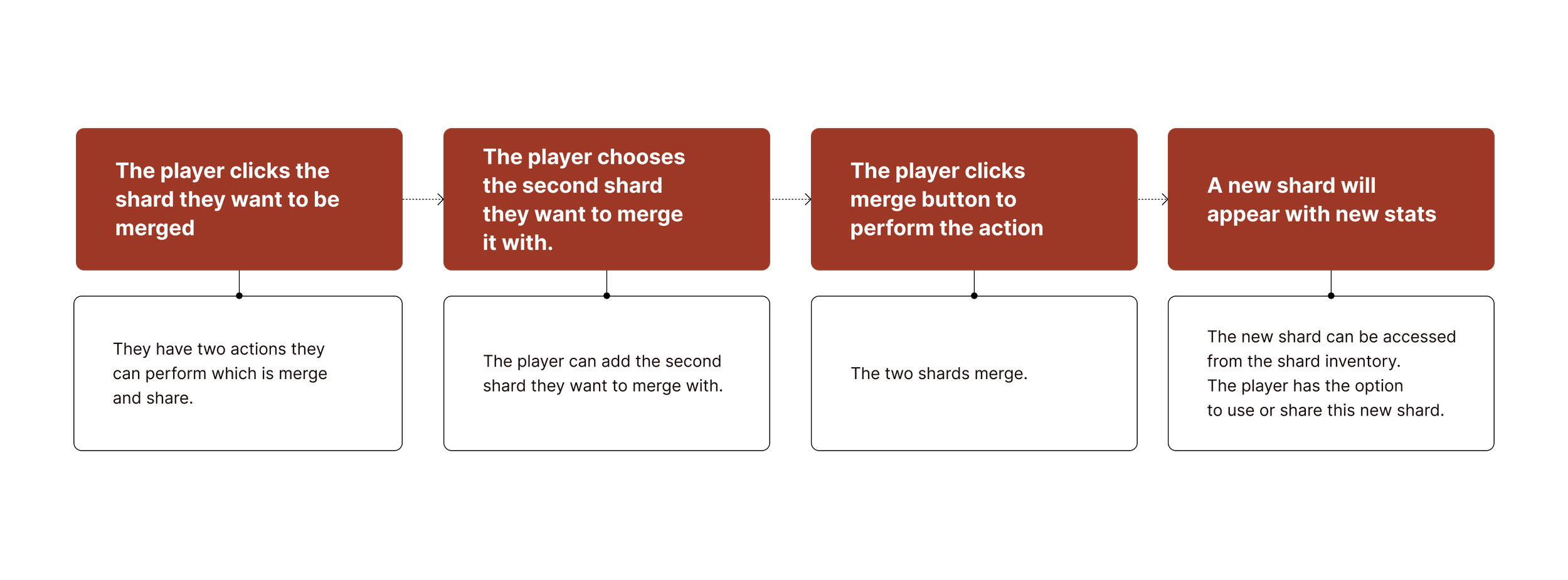
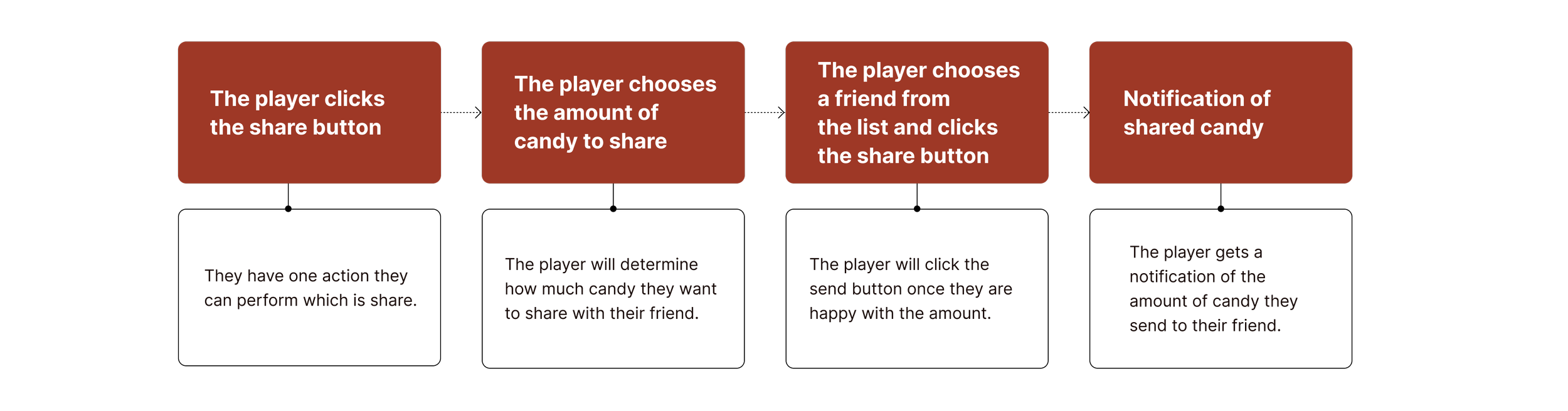
To understand how the user interacts with the inventory, I focused on the 3 key tasks, which is unlock and open a chest, merge two shards and share candy with a friend. I mapped user flow and user journey for these 3 tasks to identify potential blockers.
The chest gameplay loop
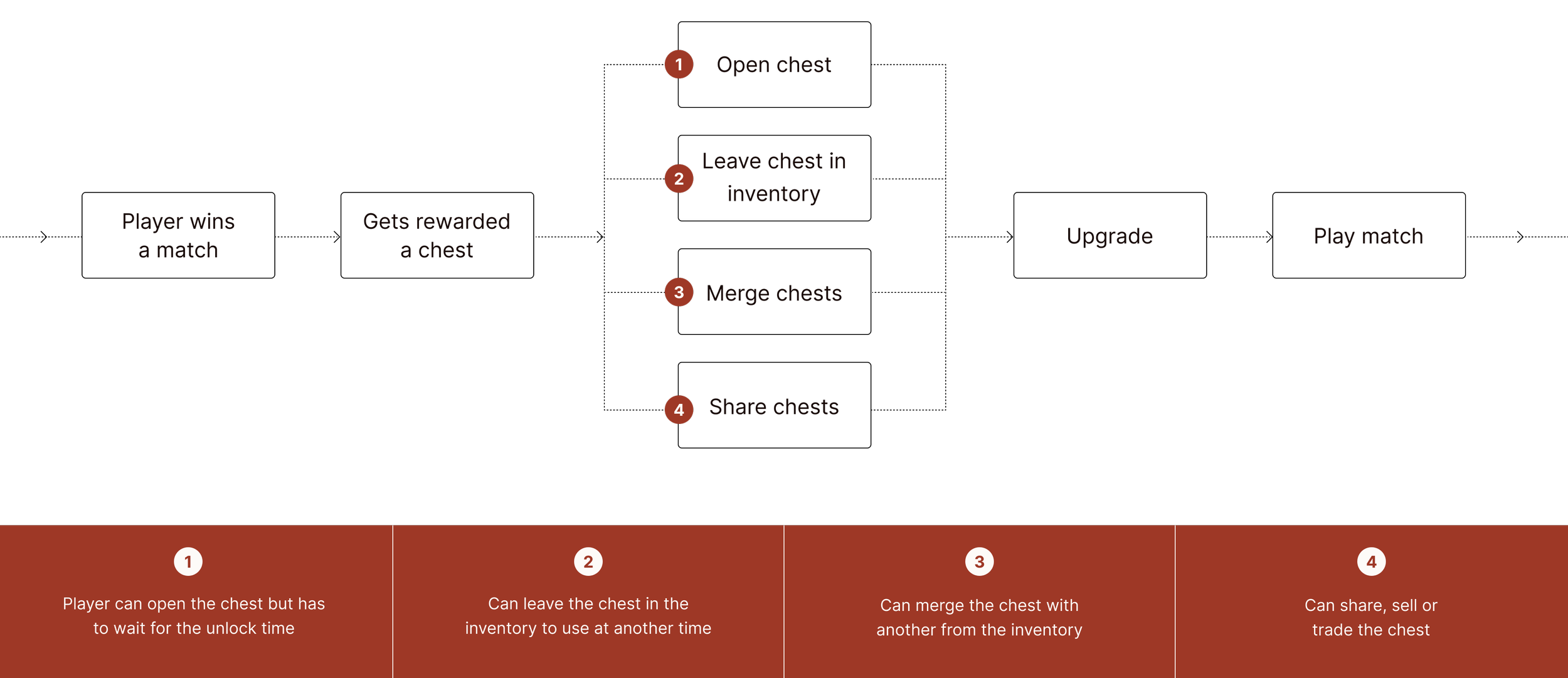
The player wins a match and is rewarded with a chest.
Each chest has an unlock time which increases with the rarity.
Task 1: Unlock and open a chest
USER JOURNEY
The Shard gameplay loop
The player wins a match and is rewarded with a shard.
Each shard a boost time which increases with the rarity.
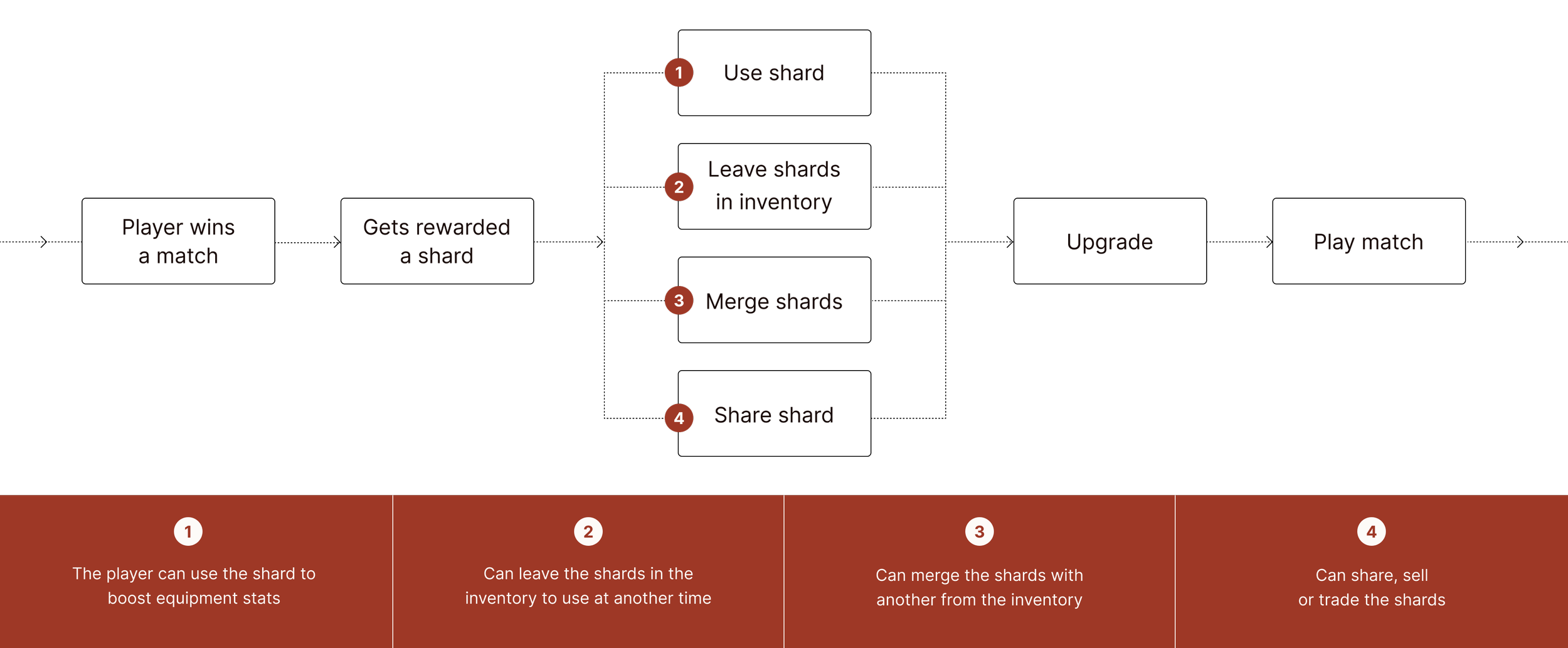
Task 2: Merge a shard
USER JOURNEY
The candy gameplay loop
The player wins a match and is rewarded with candy.
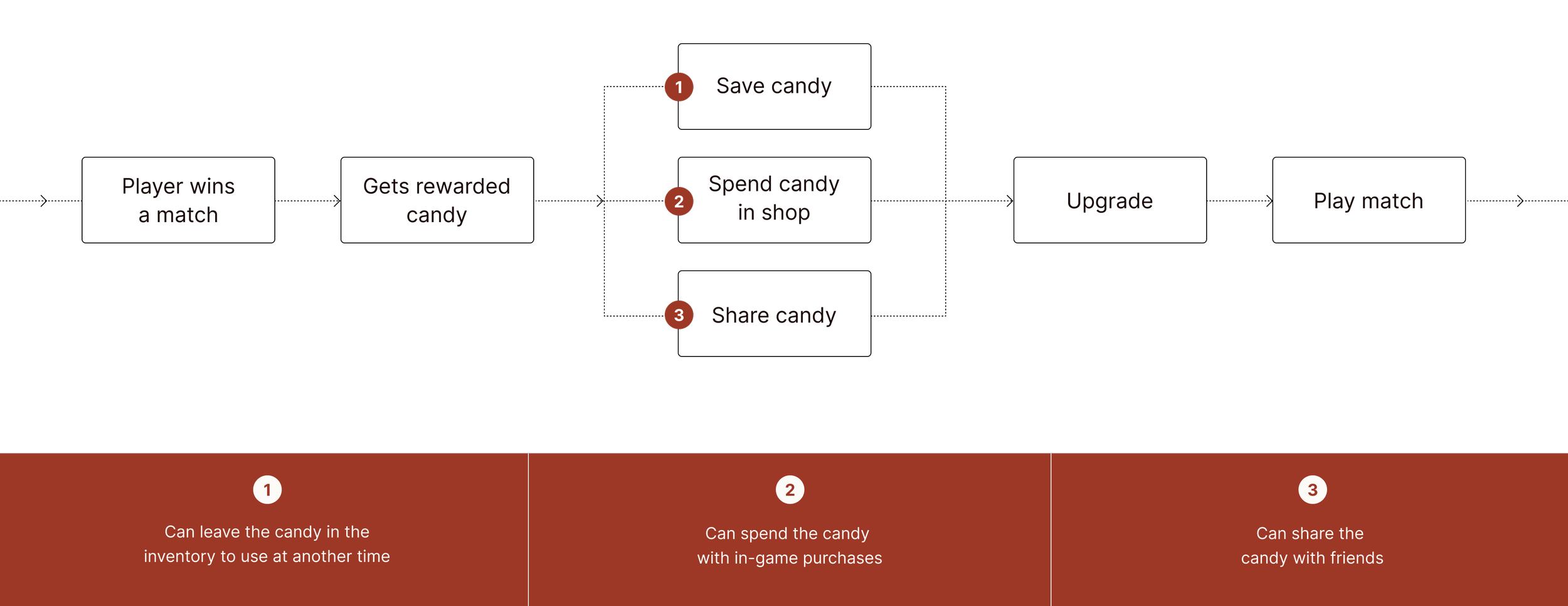
Task 3: Share candy with a friend
USER JOURNEY
Wireframes
The chest
What is the rarity of the chest
How much equipment is in the chest?
What is the rarity percentage for each piece of equipment?
How much time to unlock?
Rarity
Text or colour could be the indicator which helps identify the rarity of the chests.
Number of equipment
Number indicator to identify the number of equipment that remains in the chest
Rarity percentage for equipment
An indicator showing the player the possibility of a higher rarity in the chest
Unlock time
A visual indicator which shows the player the amount of time needed before you can open a chest. When the chest has been unlocked the indicator will be replaced with a countdown clock.
The shard
What is the rarity of the Shard?
How much boost can the shard give my equipment?
Rarity
Text or colour could be the indicator which helps identify the rarity of the shards.
Boost information
Percentage indicator to identify the boosted effectiveness
Time
An indicator showing how long the boost will last
The candy
How much candy do I have?
Value
A Currency indicator
Inventory screen
Concept 1
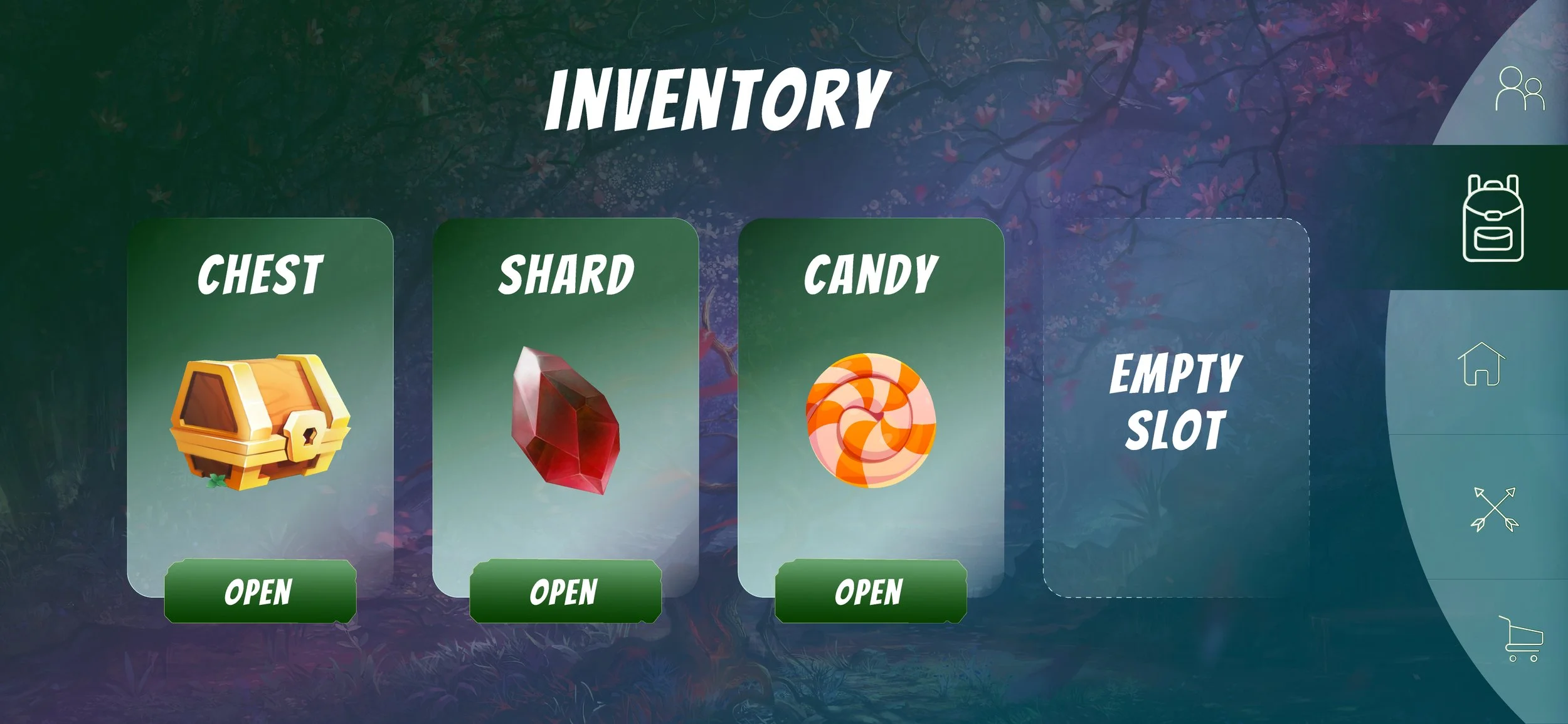
The player lands on the inventory screen when they click on the inventory icon from the navigation menu.
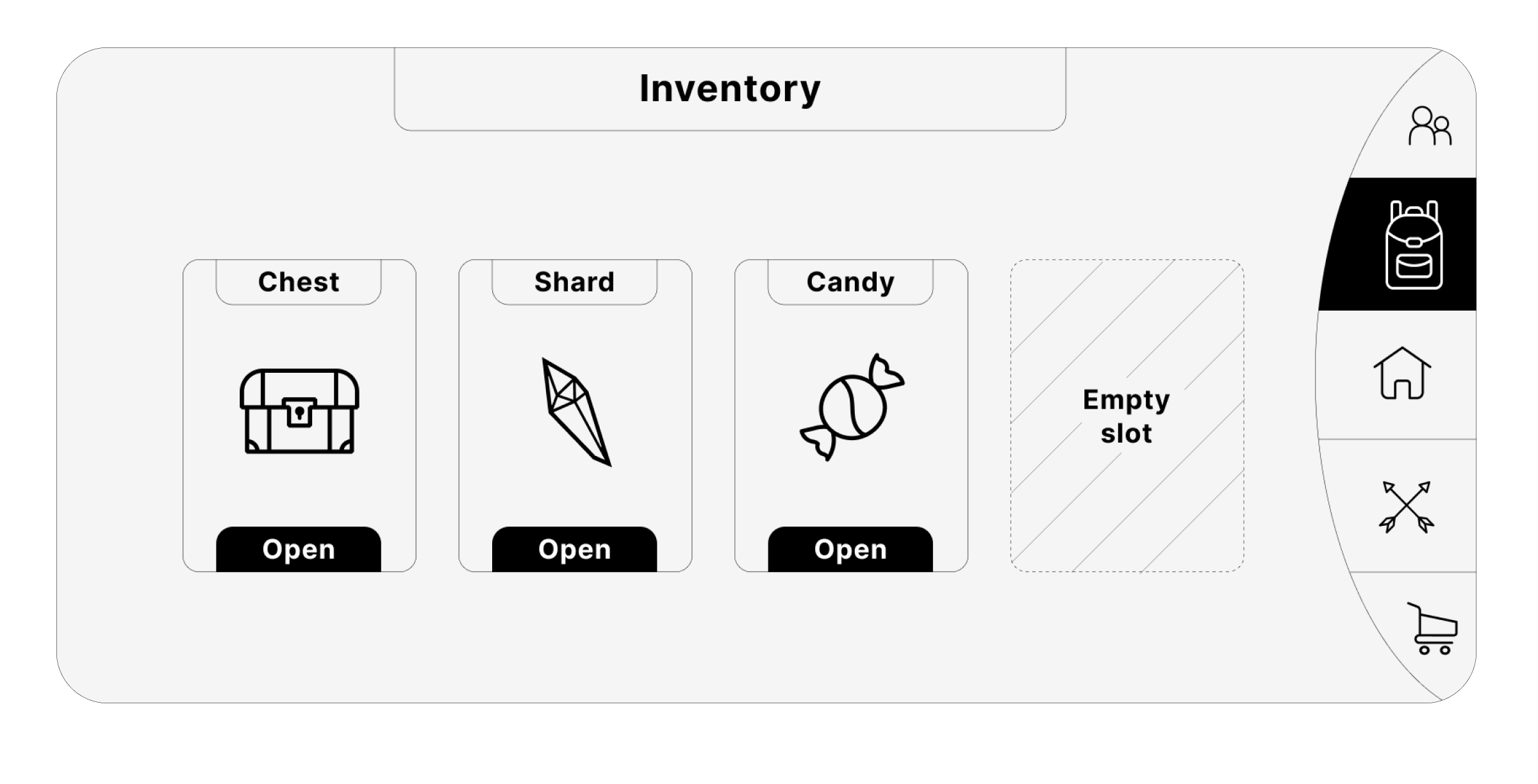
There is an empty slot available, which will give the player the indication that there is a new item to unlock. It creates a bit of mystery about what this could be, giving the player the incentive to continue progressing through the game to find out.
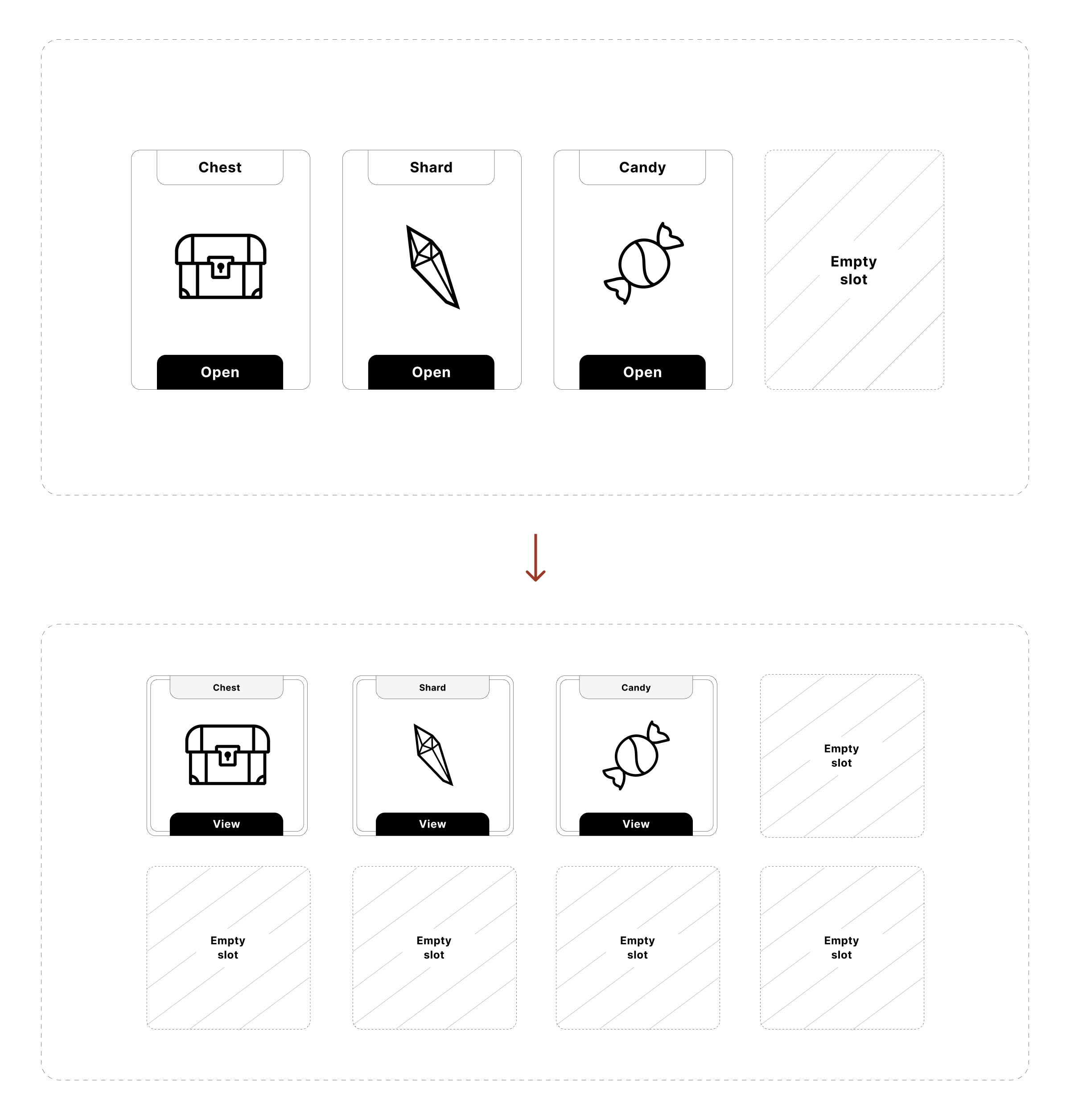
If there is more than one item being added in future updates, the design can be scaled to a 4 by 4 grid.
Concept 2
This concept gives the elements larger space which could be more impactful to the player.
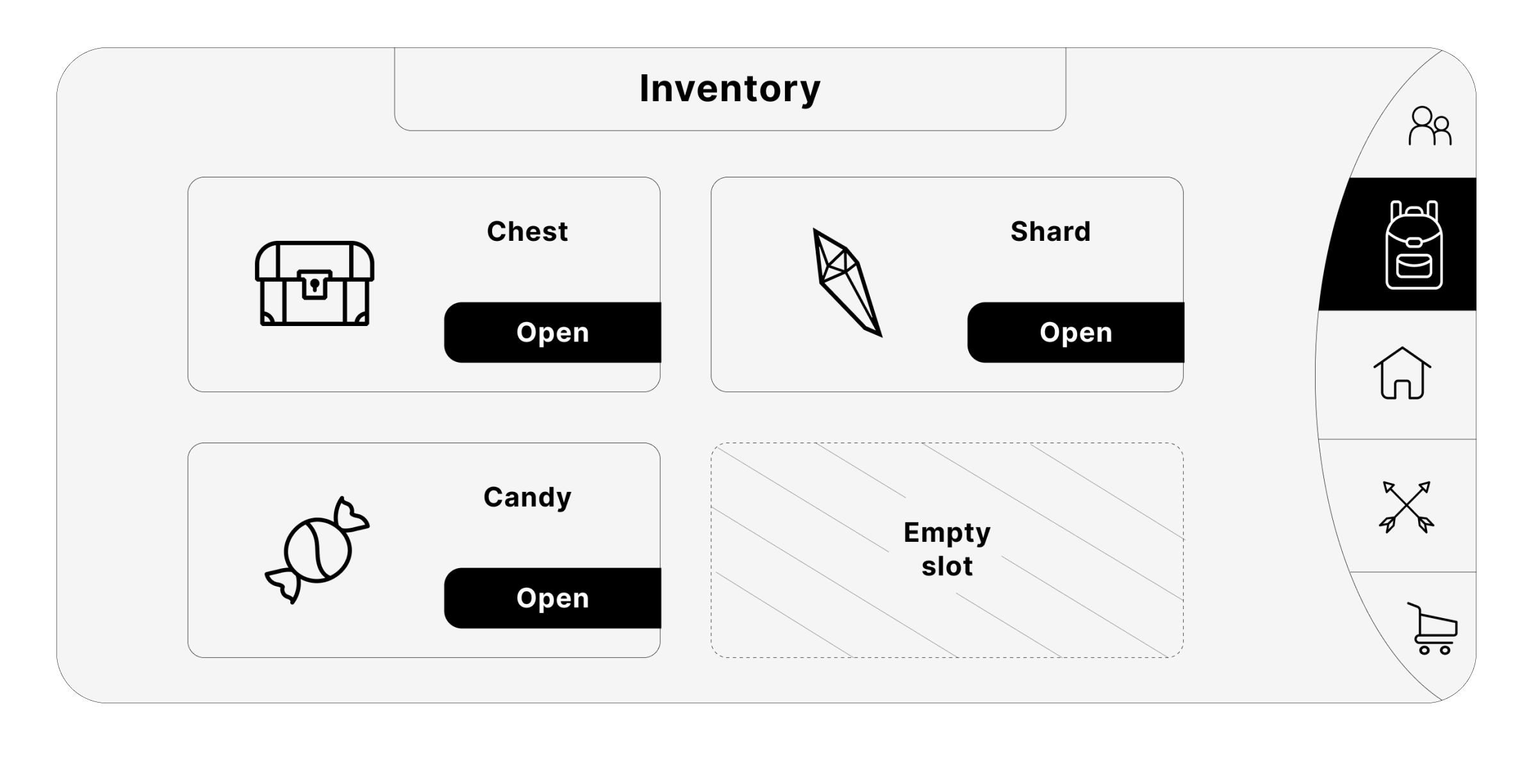
Although the elements are bigger in concept 2, the flexibility of concept one is the prefered choice. If more items were added at a later stage concept 2 will need to be redesigned. Whereas concept 1 is more scalable.
The preferred option for scalability
Concept 1
This concept allows seamless scalability going from a single grid system to a 4 by 4 grid.
Unlock function
When the player clicks the oak chest the related information is seen in a pop-up window. Here the player has insight into the number of badges in the chest and the amount of time to unlock. The player can merge, share or unlock the chest.
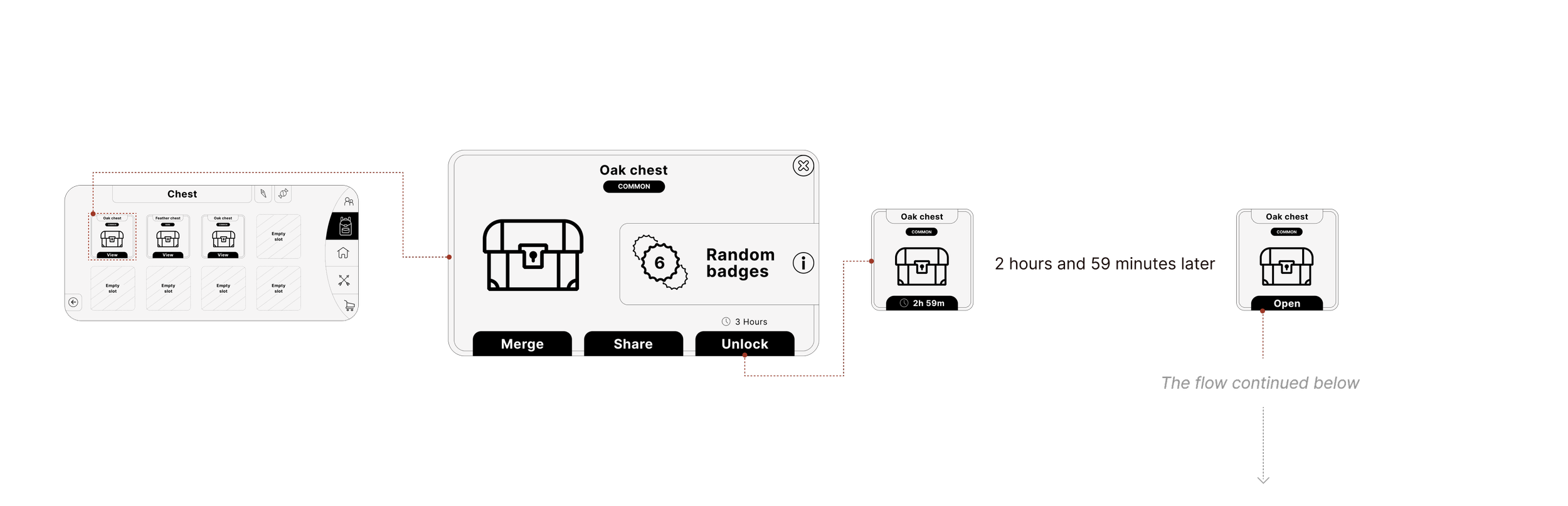
Reveal items and equipments
Once the unlock time has elapsed the player can now open the chest. This chest has 6 badges and these badges can be a duplicate of either an item or an equipment. This chest has 3 badges of candy and 3 badges with an arrowhead called the stinger.
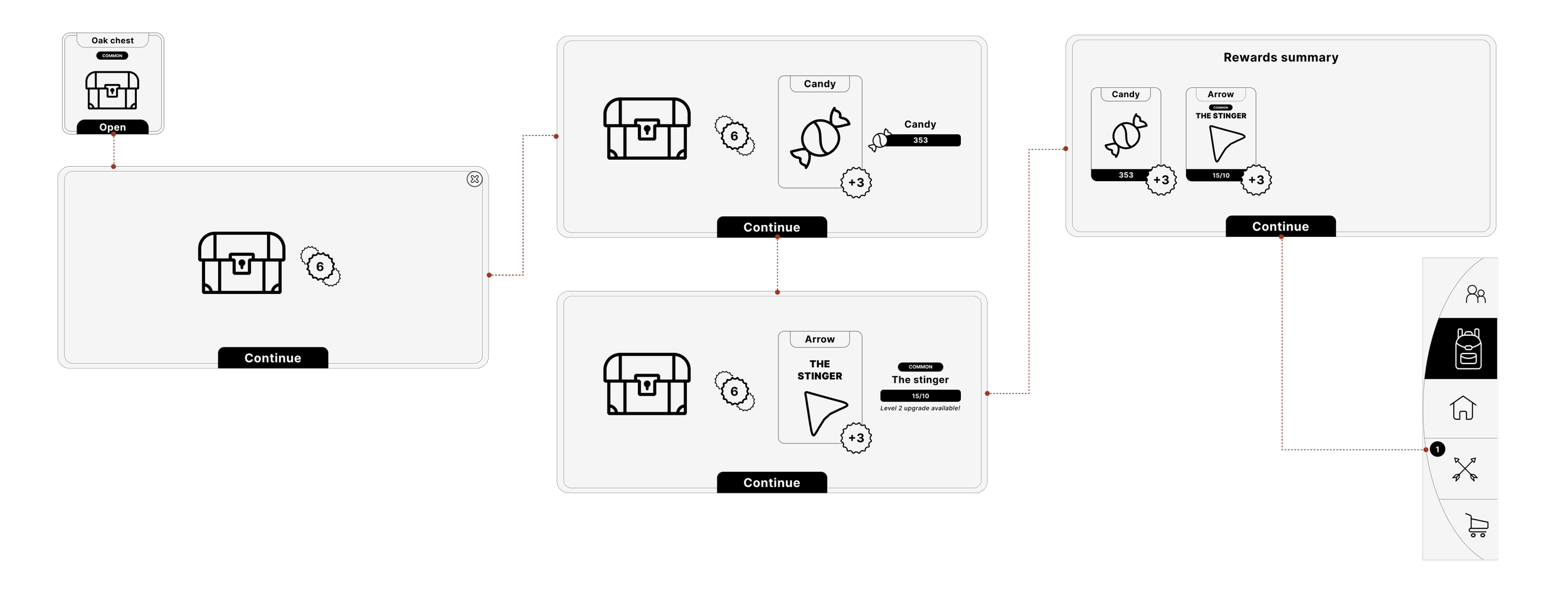
The player has collected the correct number of the stinger badge to be able to upgrade this equipment. A notification will appear on the navigation menu to let the player know there is an equipment available for upgrade.
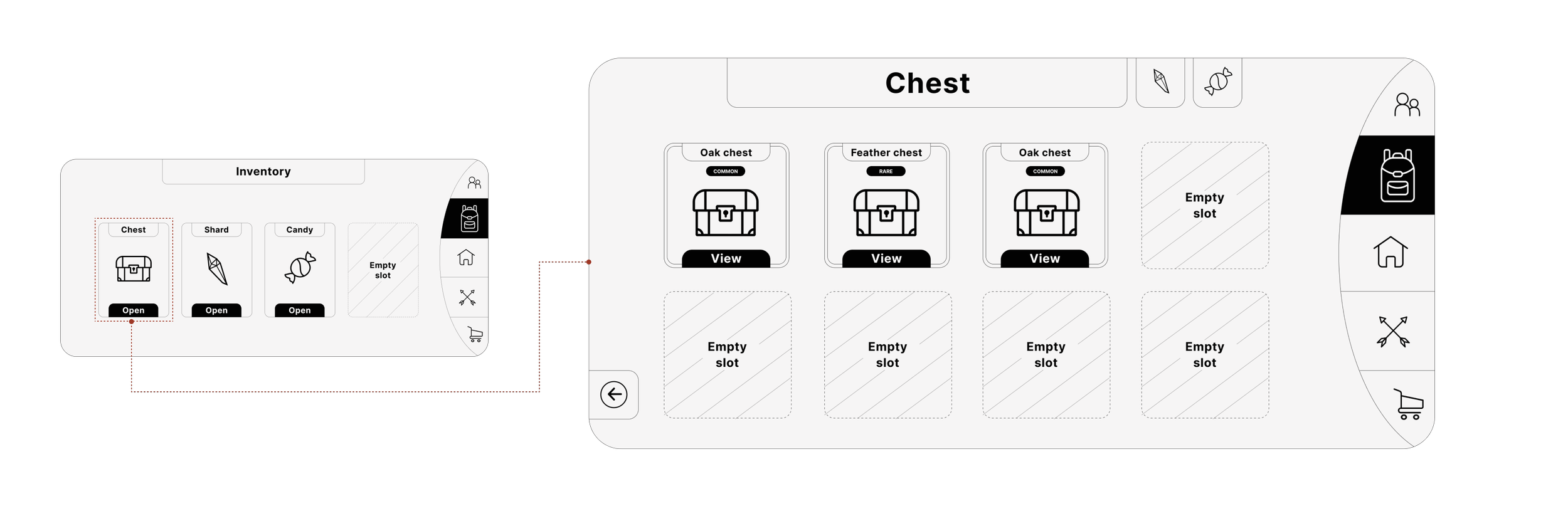
Opening the chest
If the player clicks the chest from the previous screen they will be navigated to the chest inventory screen.
The chest inventory cannot store more than 8 chests at one time. This prevents the player from hoarding items and this will force the player to unlock merge or trade the chests.
Shard merge flow
If the player clicks the shard from the inventory landing screen they will be navigated to the shard inventory screen.
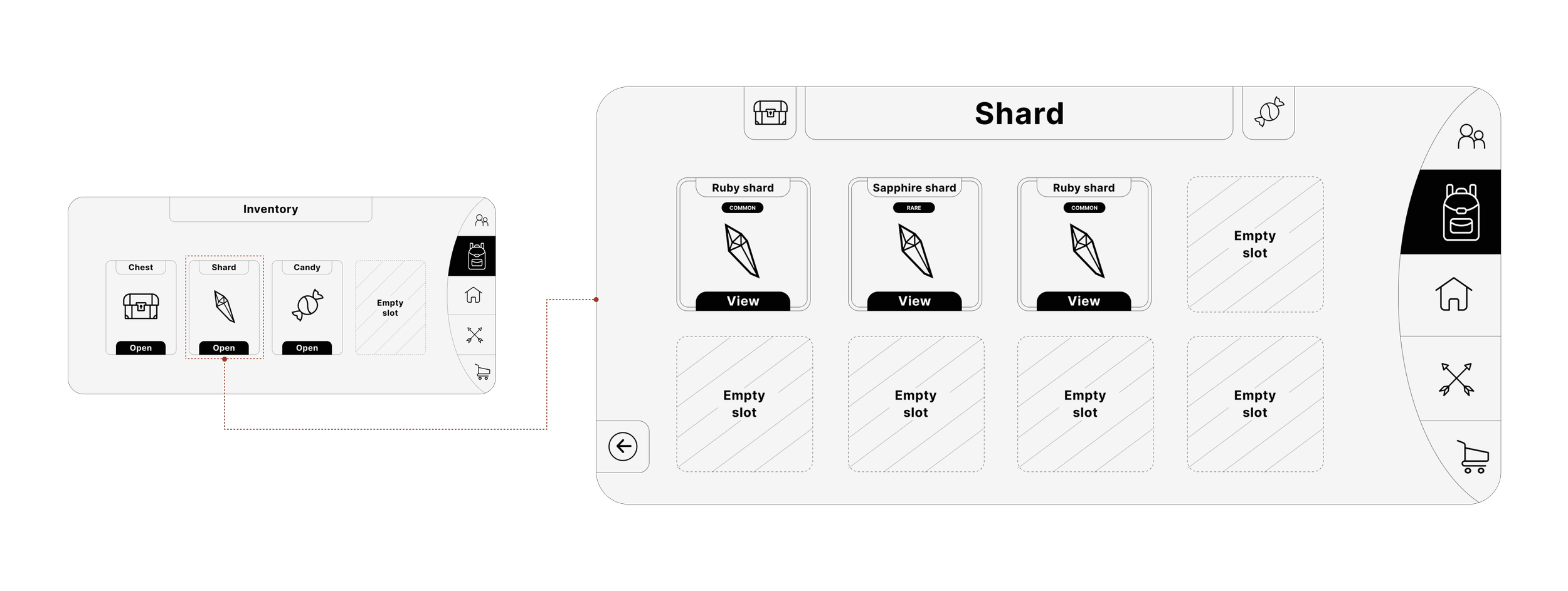
The shard inventory cannot store more than 8 shards at one time. This gives the player an added decision layer of when to boost their equipment stats. Given that there is a limited time the stats are boosted this will give the player the incentive to continue with the game.
Merging two shards
When the player clicks the Sapphire shard the related information is seen in a pop-up window.
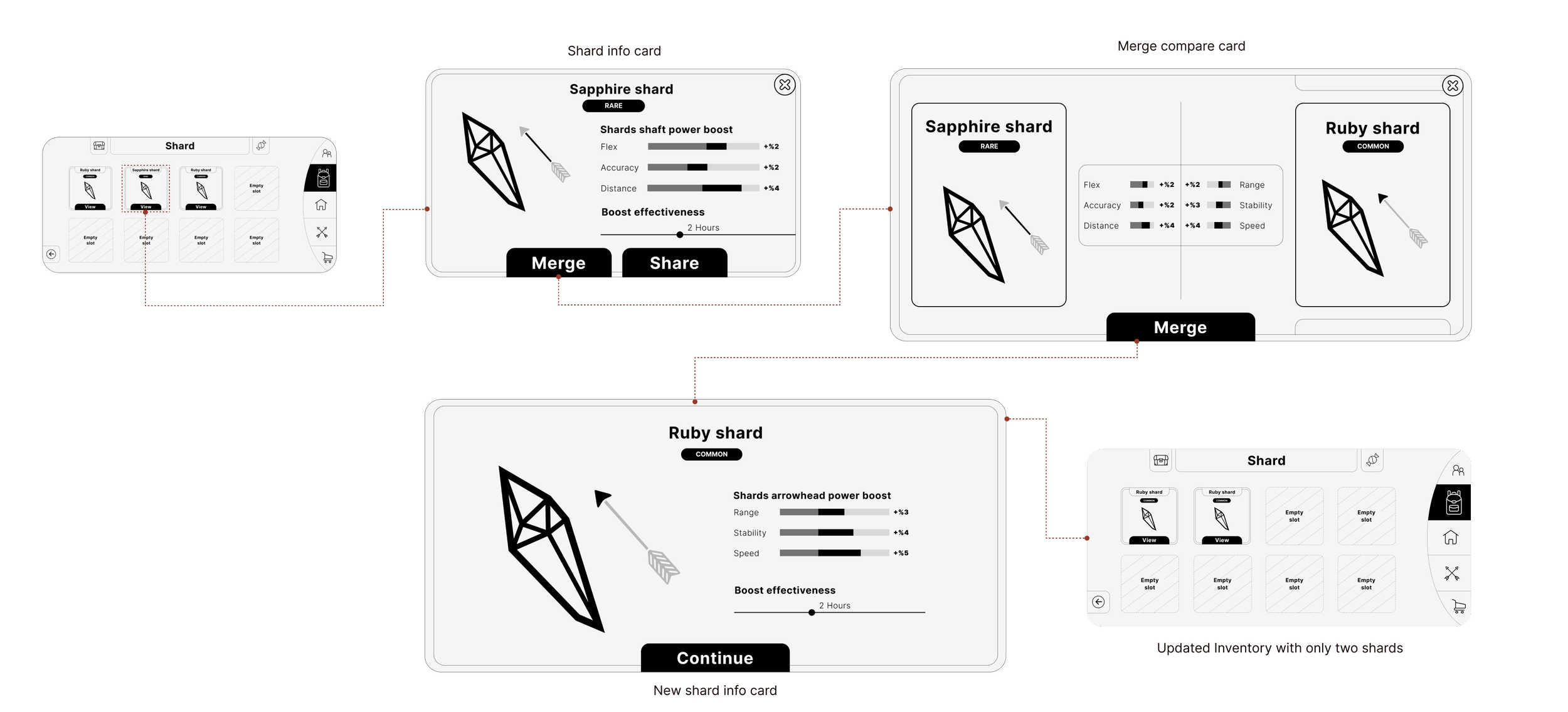
When the player clicks merge a new pop-up window will appear. From this window, they can swipe up or down to change the shard they wish to merge. Once the two chosen shards have merged a new shard will appear with updated stats.
Candy share flow
If the player clicks the Candy from the inventory landing screen they will be navigated to the Candy inventory screen.
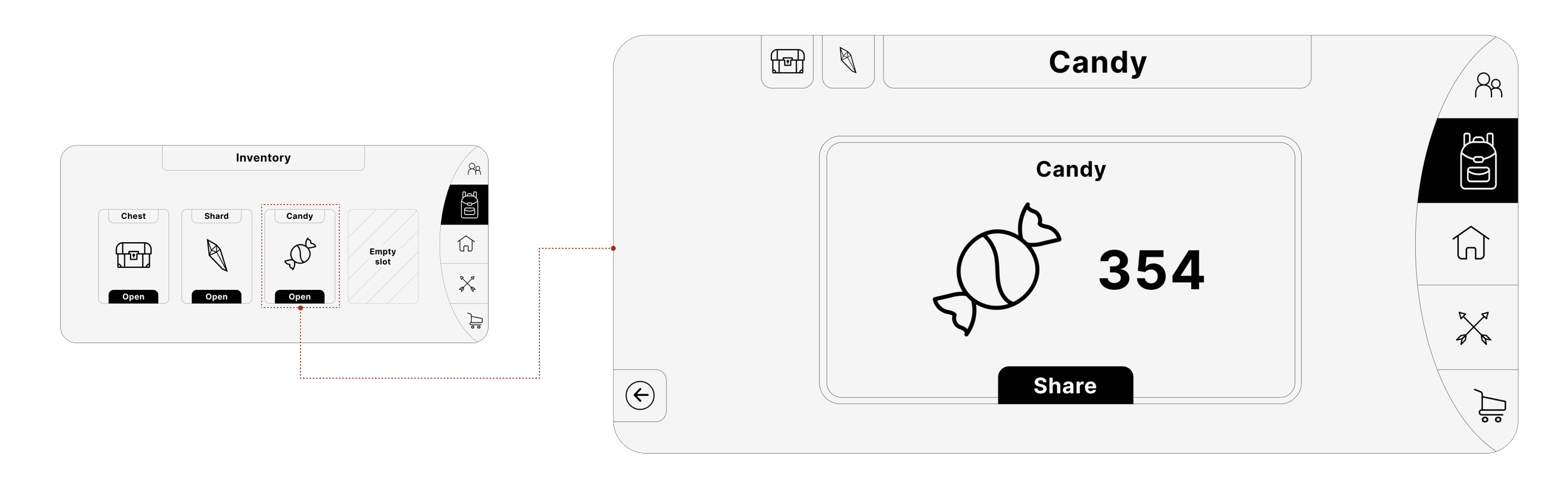
In the candy inventory screen, the player can see the total amount of candy they have.
Sharing candy with a friend
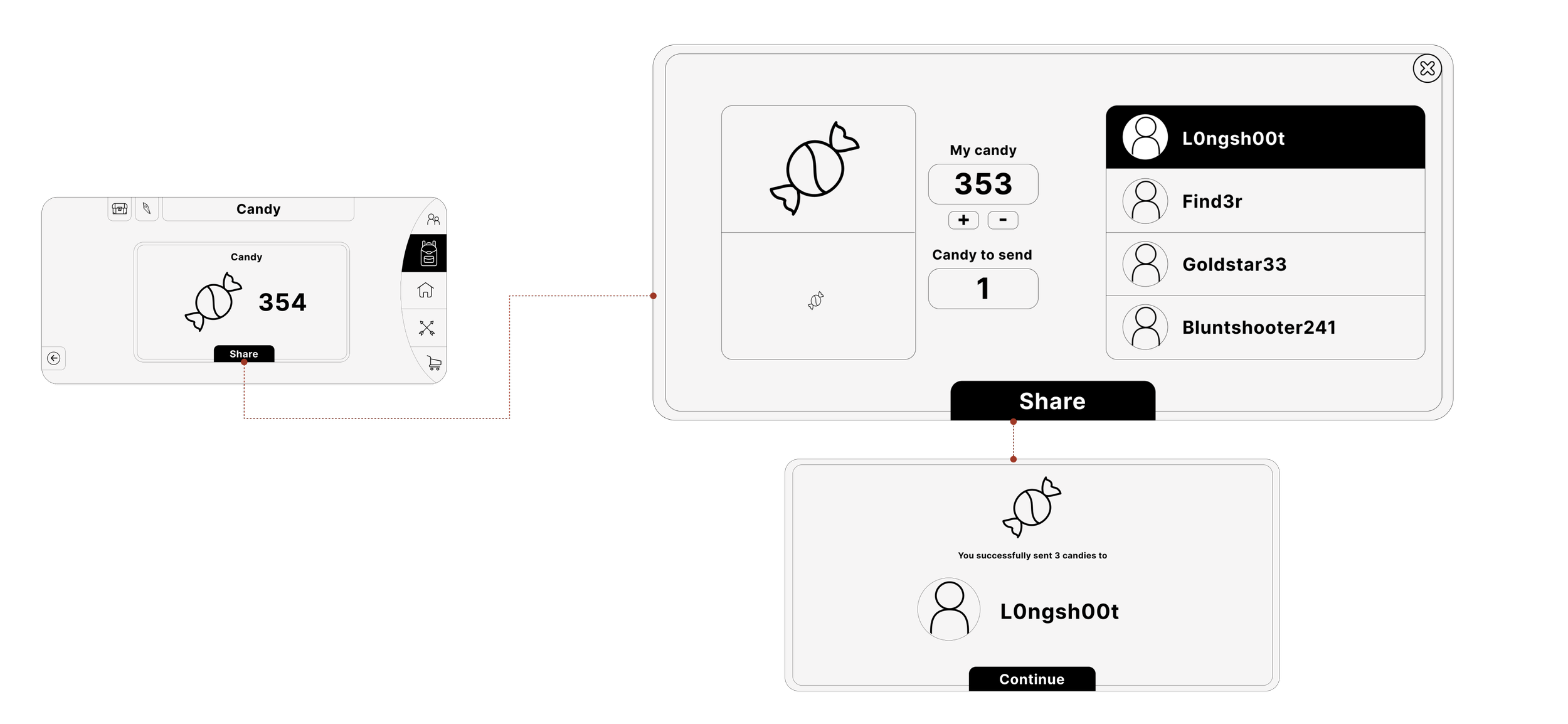
The player clicks the share action from the candy inventory screen. The candy share option appears as a pop-up window where the player can set an amount of candy to share with a friend. The player can add which friend to send the candy to.
Research
Learning objectives
Objective 1
Understand the end-to-end journey of how and why participants use items from the inventory.
Understanding how and why participants interact with the items and how this affects their gameplay style.
Objective 2
Uncover participants' thought processes and prior experiences when taking the actions relating to each item in the inventory.
Interested in seeing what their thought process is behind the process, and if/why they have done so in the past. It creates a clear understanding and a good foundation to build from.
Objective 3
Discover if any of the items have made an impact on the participants' gameplay style and how they feel about progressing with the game.
Interested to see if the participants understand the core gameplay loop and how these items affect the way the game is played.
Research objective
Identify areas of friction that the users may face when interacting with the inventory function.
Research method
User interview
For this research study, I am using a one-on-one user interview where I will be conducting moderated usability testing using a prototype. With this method, I will gain a deeper understanding by using follow-up or probing questions to see the exact decision the participants take at each step.
Player archetype
A casual gamer who plays games in their spare time or at social events.
Participants
5-8 participants are recruited depending on how the studio recruits, which could be from surveys, forums or from the game app.
Call duration
1-hour video call over zoom. The call will be remote with screen sharing capabilities and the participants will have a link to the Figma prototype at the start of the call.
Call Plan
Introduction (10 minutes)
In the introduction section of the call, I will go over the agenda of the call with the participants so they know what to expect. At this point, I will share the Figma link for the prototype walkthrough and I will inform the participant that I will prompt when to move through the prototype.
Moderated usability testing (15 Minutes per task)
The task-based walkthrough will consist of three tasks for the participants to complete.
Unlock and open a chest, starting from the inventory landing screen.
Merge two shards, starting from the inventory landing screen.
Share candy with a friend starting from the inventory landing screen.
Task one
Unlock and open a chest
The inventory screen
Tell me what you see on the screen.
Follow up: What actions do you think you can take?
Chest inventory screen
Explain to me what you see on the screen.
Follow up: What is your understanding of these elements and what do you think you can do with them?
Unlocking and opening the chest
Describe your experience of unlocking and opening the chest.
Follow up: Was there anything unclear with the step, any information that could have helped?
Upgrade discovered inventory screen
Walk me through what your next action would be.
Task two
Merge two shards
Shard inventory screen
Could you describe to me what you see on the screen?
Follow up: What is your understanding of these elements and what do you think you can do with them?
Merge shards function
Tell me what you see on the screen.
Follow up: What actions can you take with the elements on the screen?
Task three
Share candy with a friend
Candy inventory screen
Can you please tell me what you see on the screen?
Follow up: What is your understanding of this item and what do you think you can do with it?
Candy sharing screen
Describe to me the action you think you can perform on this screen.
Follow up: Are the action you need to take clear?
Inventory screen
Now that we have gone through three tasks what would be the next action you would take?
Observations
There are a few aspects that are vital to the functionality of the inventory system. Throughout the interview, I will be observing and tailoring my questions to understand the following functionalities.
Does the participant understand the different rarity values?
Is the chest unlock times clear?
How does the participant feel about the implications of merging two items?
What would the participant do with upgrade equipment received from the unlocked chest?
Wrap-up (5 Minutes)
Finally, a call wrap-up where I present a chance for the participants to ask any questions they have. Also, take this opportunity to thank them for their time and ask if they would be interested in being a part of future research.
Research Analysis
Affinity mapping workshop
I will facilitate an affinity mapping workshop using the feedback gathered from the user interviews. Stakeholders to consider for the workshop could include a game designer, project manager, UX team, lead UI designer and the lead developer.
The reasoning for an affinity mapping workshop is to extract insight and group them into themes. This can help identify key areas of the inventory feature that need further understanding and improvement.
Plan of action
Once the key insights, user needs and pain points have been discovered this can now be translated into design iterations.
This will help progress the design process and the inventory function.
Stage two
Usability testing
Insights gathered at stage one will be implemented into a high-fidelity working prototype. The next stage of the User research would be to conduct a usability test to gather further feedback.
Success metrics
At this stage, success metrics will be identified which will give a quantifiable way to measure progress. Setting metric-based goals give the ability to track user behaviour and better understand how the game is played.
Fantasy Football
Building an engaging and seamless player management system
Stone Breaker